

instro is a Python library with the following objectives:
- Accelerate the authoring of tests which rely on hardware instruments.
- Provide abstractions that allow code reuse across various instrument models, so you can swap vendors without rewriting your test.
- Define entry points for creating instrument interfaces and drivers that integrate with the library.
- When you want to capture the data, offer low-code publishing to a file, a custom destination, or Nominal tools like Connect and Core.
Problem Space: Before and After
Before: a different SDK for every vendor
Here’s what’s required to read analog data from two different DAQ vendors using their native SDKs. Each device has its own API, configuration sequence, and data-handling quirks, and the acquisition logic is tangled together with the code that ships the samples somewhere.LabJack T-Series Devices
LabJack T-Series Devices
NI DAQ Devices
NI DAQ Devices
After: one API across vendors
Here’s the same workflow usinginstro’s InstroDAQ. The acquisition code is identical across vendors: change the driver and the rest stays the same. Capturing the data is one optional line (add_publisher(...)); drop it and the same script just reads into your process.
Key Concepts of instro
- Code to an interface, not the specific instrument in use.
- Configurable background daemons read and expose measurements to your script.
- Optional data publishing to a file, a custom destination, or Nominal Core and Nominal Connect, by way of a customizable
Publisherinterface. Attach one when you want to capture data; skip it andinstrois just an instrument-control library.
Two ways to get data
You can get measurements into your script in two ways. If a publisher is attached, both options publish data whenever a measurement is produced. The difference is who triggers the reads and how often.RecommendationUse the background daemon pattern for most workflows. Data is always available and publishing, and it often simplifies application code, especially for buffered acquisitions from a DAQ where you’d need to manage servicing a buffer yourself.Depending on your application, you may never need to call
get_channel(), but the background daemon will always publish measurements for later analysis in tools like Nominal Core.High Level Architecture
- Instrument Types / HALs: Distinct classes for each type of instrument (e.g., DAQ, PSU, ELoad, I2C), each providing an opinionated and unified usage model. This design exposes a tailored interface that reflects typical usage patterns, making common workflows consistent across different vendors and models.
- Drivers: Vendor- or model-specific drivers that handle low-level communication intricacies. HALs rely on these drivers to implement vendor- or model-specific details within the context of their higher level usage model.
- Publishers: Components responsible for recording or transmitting instrument data and commands. For example, streaming measurement data to a dataset.
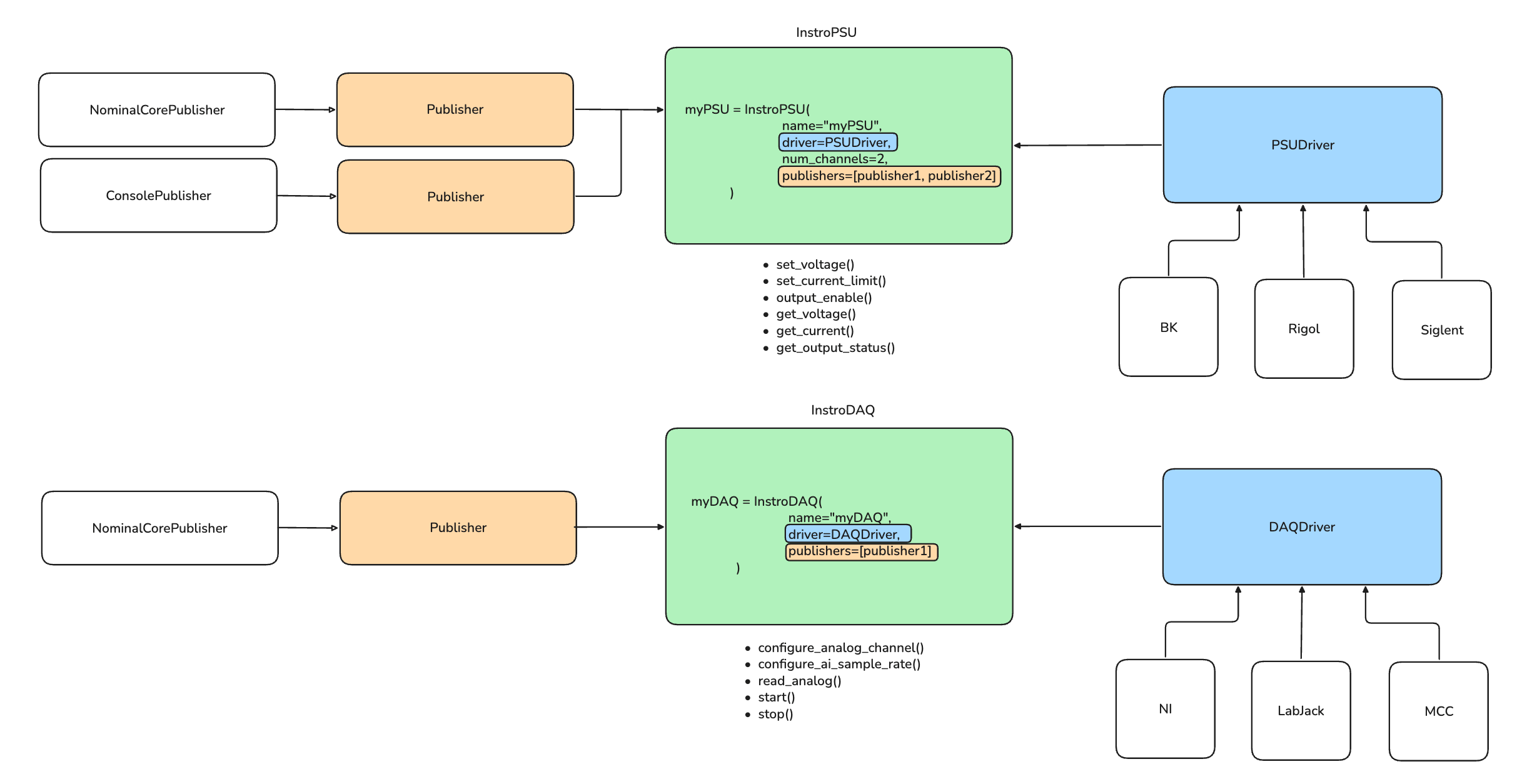
PublishersData is published as a direct result of an instrument method being called.For example, when you call
InstroPSU.get_voltage(), this not only queries the instrument for the voltage but also causes all attached Publishers to publish the measurement response automatically.This makes it easy to ensure measurements and state changes are consistently recorded or streamed without explicitly managing yourself.Instrument Types
These are the instrument types available out of the box.InstroPSU: programmable Power SuppliesInstroDAQ: data Acquisition devicesInstroELoad: electronic LoadsInstroDMM: digital MultimetersInstroScope: oscilloscopesI2CInterface: I2C master for communicating to peripherals on an I2C busModbusDevice: Modbus register/coil device (TCP or RTU)EtherNetIPDevice: EtherNet/IP and CIP devices, viainstro.ethernetip(install withinstro[ethernetip])
Drivers
These are the vendor/model-specific drivers available out of the box.InstroPSU- B&K Precision
- Keysight
- Siglent
- Rigol
- TDK Lambda
InstroDAQ- National Instruments (NI)
- LabJack T-Series
- Measurement Computing (MCC)
- Keysight 34980
InstroELoad- B&K Precision 85xx Series
I2CInterface- Total Phase Aardvark
InstroDMM- Keithley 2400
- Agilent/HP/Keysight 34401A
InstroScope- Keysight 1200X
- Tektronix 2-Series
- Siglent SDS1000X-E
Publishers
These are the publishers available out of the box.NominalCorePublisher: sends data to a Nominal Core datasetNominalConnectPublisher: sends data to a Nominal Connect clientFilePublisher: writes data to a local file in Avro, CSV, or JSON Lines
BasicBufferedPublisher and QueuedPublisher wrap any of the above to add in-memory batching or non-blocking background delivery. See Publishers for configuration and examples.